ChatGPT + Google Flow ทำวิดีโอ
จากสตอรี่บอร์ดสู่คลิปด้วย AI
ใช้ ChatGPT คิดเรื่อง ทำสตอรี่บอร์ด กำหนดฉาก และสร้างภาพประกอบ แล้วส่งต่อให้ Google Flow (ขับเคลื่อนด้วย Veo) สร้างเป็นวิดีโอ — พร้อมคลัง Prompt ให้คัดลอกใช้ได้ทันที
🤖 ChatGPT
ช่วย “คิดเรื่อง” — วางโครงเรื่อง เขียน สตอรี่บอร์ด กำหนดฉาก และเขียน Prompt สร้าง ภาพประกอบ ของแต่ละฉาก
🎬 Google Flow
ช่วย “ทำวิดีโอ” — เปลี่ยน Prompt/ภาพเป็น คลิป (ขับเคลื่อนด้วย Veo) ต่อฉาก คุมกล้อง และคุมความต่อเนื่องด้วยภาพอ้างอิง
เปรียบเทียบง่าย ๆ: ChatGPT = ทีมเขียนบท + สตอรี่บอร์ด · Google Flow = ทีมถ่ายทำ + ตัดต่อ — Google Flow เป็นเครื่องมือทำหนังด้วย AI ของ Google Labs (labs.google/flow)
| สิ่งที่ต้องมี | หมายเหตุ |
|---|---|
| บัญชี ChatGPT | ใช้คิดเรื่อง เขียนสตอรี่บอร์ด และสร้างภาพประกอบ |
| บัญชี Google + Flow | Google Flow ต้องใช้แพ็กเกจ Google AI Pro / Ultra และเปิดบริการตามประเทศ |
| อินเทอร์เน็ต | ควรเสถียร เพราะการเรนเดอร์วิดีโอใช้เวลา |
| เบราว์เซอร์ (เดสก์ท็อป) | Chrome / Edge / Safari เวอร์ชันล่าสุด |
| ช่วง | หัวข้อ | เป้าหมาย |
|---|---|---|
| 10 นาที | รู้จัก ChatGPT + Google Flow | เข้าใจว่า ChatGPT คิดเรื่อง · Flow ทำวิดีโอ |
| 15 นาที | คิดเรื่อง + สตอรี่บอร์ด | ได้โครงเรื่องและแบ่งฉากชัดเจน |
| 15 นาที | กำหนดฉาก + ภาพประกอบ | ได้ภาพ reference คุมสไตล์ทุกฉาก |
| 20 นาที | สร้างวิดีโอใน Google Flow | สร้างคลิปแต่ละฉากจาก Prompt/ภาพ |
| 20 นาที | ต่อฉาก + ปรับกล้อง | เชื่อมฉากให้ลื่นและคุมมุมกล้อง |
| 10 นาที | รวม + ส่งออก | ได้วิดีโอสมบูรณ์ 1 ชิ้น |
-
เปิด Google Flow แล้วล็อกอิน
เข้า labs.google/flow → ลงชื่อเข้าใช้ด้วยบัญชี Google
ต้องมีแพ็กเกจ Google AI Pro/Ultra และเปิดบริการในประเทศนั้น ๆ · เช็กสิทธิ์บัญชีก่อนสอน
-
สร้างโปรเจกต์ใหม่
กด New project เพื่อเริ่มงานวิดีโอชิ้นใหม่
-
เลือกวิธีสร้างคลิป
Text to Video (จากข้อความ) · Frames to Video (จากภาพนิ่ง) · หรือ Ingredients to Video (ใส่ภาพอ้างอิงคุมตัวละคร/สินค้า)
-
วาง Video prompt แล้ว Generate
วาง Video prompt ที่ได้จาก ChatGPT (หรืออัปโหลดภาพประกอบ) แล้วสั่งสร้างคลิปฉากแรก
-
ใช้ Ingredients คุมความต่อเนื่อง
อัปโหลด ภาพอ้างอิง (ภาพประกอบจาก ChatGPT/Imagen) เพื่อให้ตัวละคร/สินค้าหน้าตาเหมือนเดิมในทุกฉาก
-
ต่อฉาก + ปรับกล้องใน Scenebuilder
ใช้ Scenebuilder ขยายช็อต (extend) ต่อฉากถัดไป และคุมมุม/การเคลื่อนกล้อง (pan / zoom / dolly)
-
เลือกเทคที่ดีที่สุด
แต่ละ Prompt มักได้หลายเวอร์ชัน — รีวิวแล้วเลือกอันที่ตรงสตอรี่บอร์ดที่สุดของแต่ละฉาก
-
รวมฉาก → ใส่เสียง → Export
เรียงฉากให้เป็นเรื่องเดียว ใส่เพลง/เสียงประกอบ แล้ว ส่งออก (Export) ไปโพสต์/ส่งงานจริง
ช่วยสร้างสตอรี่บอร์ดวิดีโอสั้น 30 วินาที จากไอเดียนี้

ไอเดีย:
[เล่าเรื่อง/สินค้า/ข้อความที่อยากสื่อ]

กลุ่มเป้าหมาย:
[ใครดู]

โทน/อารมณ์:
[เช่น สนุก อบอุ่น ทันสมัย ดราม่า]

ขอผลลัพธ์เป็นตาราง แบ่งเป็นฉาก (Scene) แต่ละฉากมี:
- เลขฉากและเวลาโดยประมาณ
- สิ่งที่เห็นในภาพ (subject + ฉากหลัง)
- การเคลื่อนไหว/แอ็กชัน
- มุมกล้อง/การเคลื่อนกล้อง
- ข้อความ/คำบรรยายบนจอ (ถ้ามี)
จากสตอรี่บอร์ดข้างบน ช่วยเขียน Image prompt สำหรับสร้างภาพประกอบ (reference) ของแต่ละฉาก

ข้อกำหนด:
- เขียนเป็นภาษาอังกฤษ พร้อมใช้กับเครื่องมือสร้างภาพ
- ระบุ subject, ฉากหลัง, แสง, โทนสี, สไตล์ภาพ และองค์ประกอบ
- คุมสไตล์ให้สอดคล้องกันทุกฉาก (คาแรกเตอร์/สี/มู้ดเดียวกัน)
- 1 ฉาก = 1 prompt
จากแต่ละฉาก ช่วยเขียน Video prompt สำหรับสร้างคลิปใน Google Flow

ในแต่ละ prompt ให้ระบุ:
- Subject: ใคร/อะไรอยู่ในภาพ
- Action: กำลังทำอะไร เคลื่อนไหวอย่างไร
- Camera: มุมกล้อง + การเคลื่อนกล้อง (pan / zoom / dolly / static)
- Setting: สถานที่/ฉากหลัง
- Lighting & mood: แสงและอารมณ์
- Style: สไตล์ภาพ (cinematic / realistic / anime / 3D ฯลฯ)

เขียนกระชับ ชัด เป็นภาษาอังกฤษ · 1 ฉาก = 1 prompt
ช่วยสร้างสตอรี่บอร์ดวิดีโอโฆษณาสั้น 15 วินาที ร้านชาไข่มุก Mook Mook Tea

ไอเดีย:
เปิดตัวเมนูใหม่ "ชาไทยไข่มุกบราวน์ชูการ์" ให้ดูน่ากินและสดชื่น

กลุ่มเป้าหมาย:
วัยรุ่น นักเรียน นักศึกษา

โทน/อารมณ์:
สนุก สดใส สีพาสเทล น่ารัก

แบ่งเป็น 4 ฉากสั้น ๆ แต่ละฉากบอก: สิ่งที่เห็น, การเคลื่อนไหว, มุมกล้อง, ข้อความบนจอ
ปิดท้ายด้วยโลโก้ Mook Mook Tea และ @mookmooktea
| เวลา | สิ่งที่เห็น | การเคลื่อนไหว | มุมกล้อง | ข้อความบนจอ |
|---|---|---|---|---|
| 0–3 วิ | แก้วชาไทยสีส้มพาสเทลบนโต๊ะน่ารัก มีไข่มุกบราวน์ชูการ์ด้านล่าง ฉากหลังชมพู ครีม ฟ้าอ่อน | กล้องค่อย ๆ ซูมเข้า เห็นหยดน้ำเย็นเกาะแก้ว | Close-up ด้านหน้าแก้ว | เมนูใหม่มาแล้ว! |
| 3–7 วิ | เทชาไทยลงในแก้วที่มีไข่มุกบราวน์ชูการ์ สีน้ำตาลของซอสไหลวนกับชาไทย | เทชาแบบ Slow Motion มีฟองนมเบา ๆ | มุมเฉียง 45° เน้นการไหลของชา | ชาไทยไข่มุกบราวน์ชูการ์ |
| 7–11 วิ | วัยรุ่น 2–3 คนถือแก้ว Mook Mook Tea ยิ้มสดใส ถ่ายรูป ชนแก้วเบา ๆ | ยกแก้วชนกัน หัวเราะ สนุกสนาน | Medium shot เห็นคนกับแก้วชัด | หวาน หอม หนึบ สดชื่นทุกคำ |
| 11–15 วิ | แก้วเมนูใหม่ตั้งเด่นกลางเฟรม ไข่มุกชัด พื้นหลังพาสเทล พร้อมโลโก้ร้าน | ซูมเข้าเล็กน้อย ปิดด้วยโลโก้เด้งขึ้นแบบน่ารัก | Product hero shot กลางภาพ | Mook Mook Tea · @mookmooktea |
🎵 เสียงประกอบ: เพลงป๊อปสดใส จังหวะเร็วเล็กน้อย มีเสียง “ป๊อก” ตอนโลโก้เด้งขึ้นท้ายคลิป · 🎨 โทนภาพ: พาสเทล น่ารัก สดชื่น สีส้มชาไทย + น้ำตาลบราวน์ชูการ์ + ชมพู/ฟ้า/ครีม
สร้างภาพแต่ละฉากไว้ก่อน แล้วนำไปเป็น ภาพตั้งต้น ใน Google Flow เพื่อคุมโทน คาแรกเตอร์ และแก้วให้เหมือนกันทุกฉาก (กดที่ภาพเพื่อดูเต็ม)
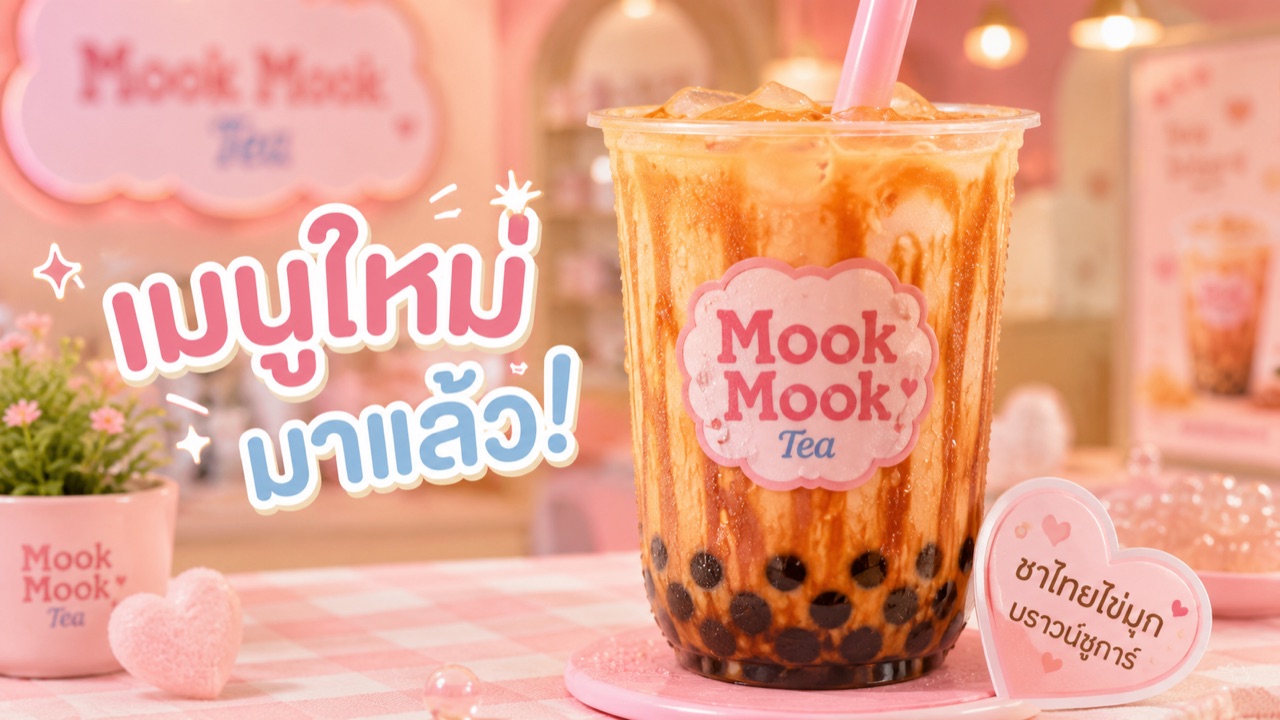 ฉาก 1 · 0–3 วิ
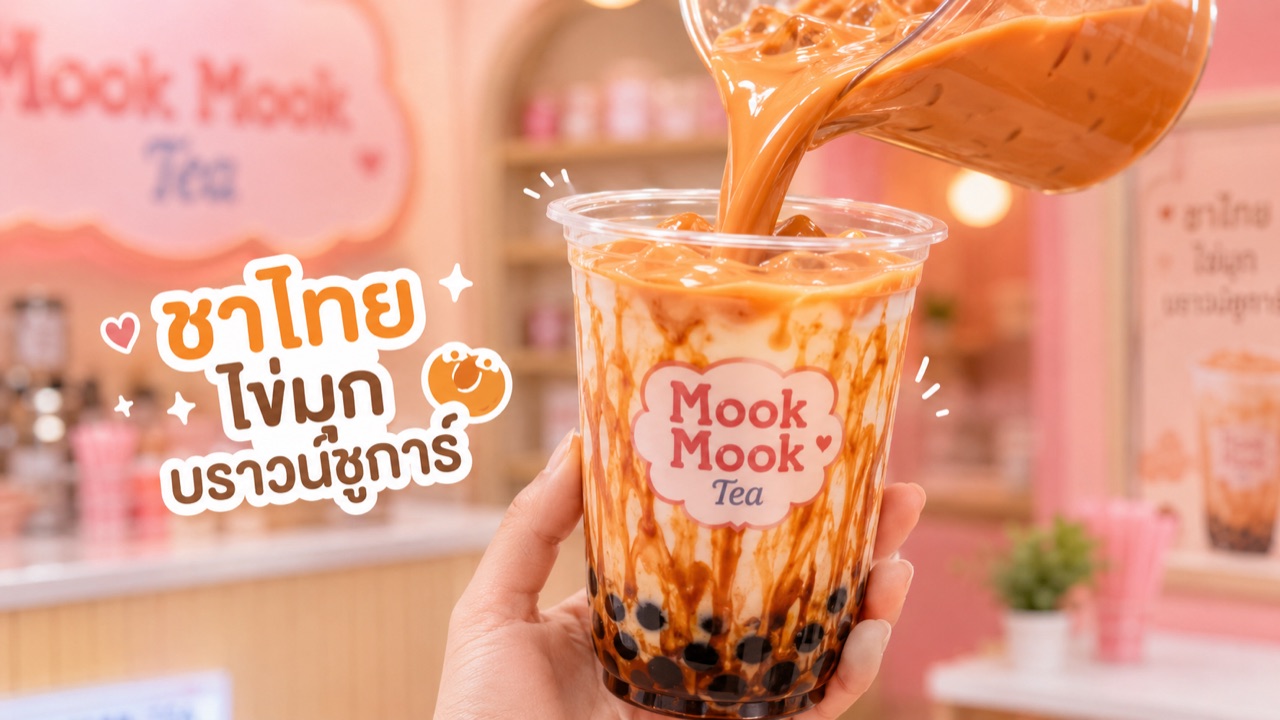 ฉาก 2 · 3–7 วิ
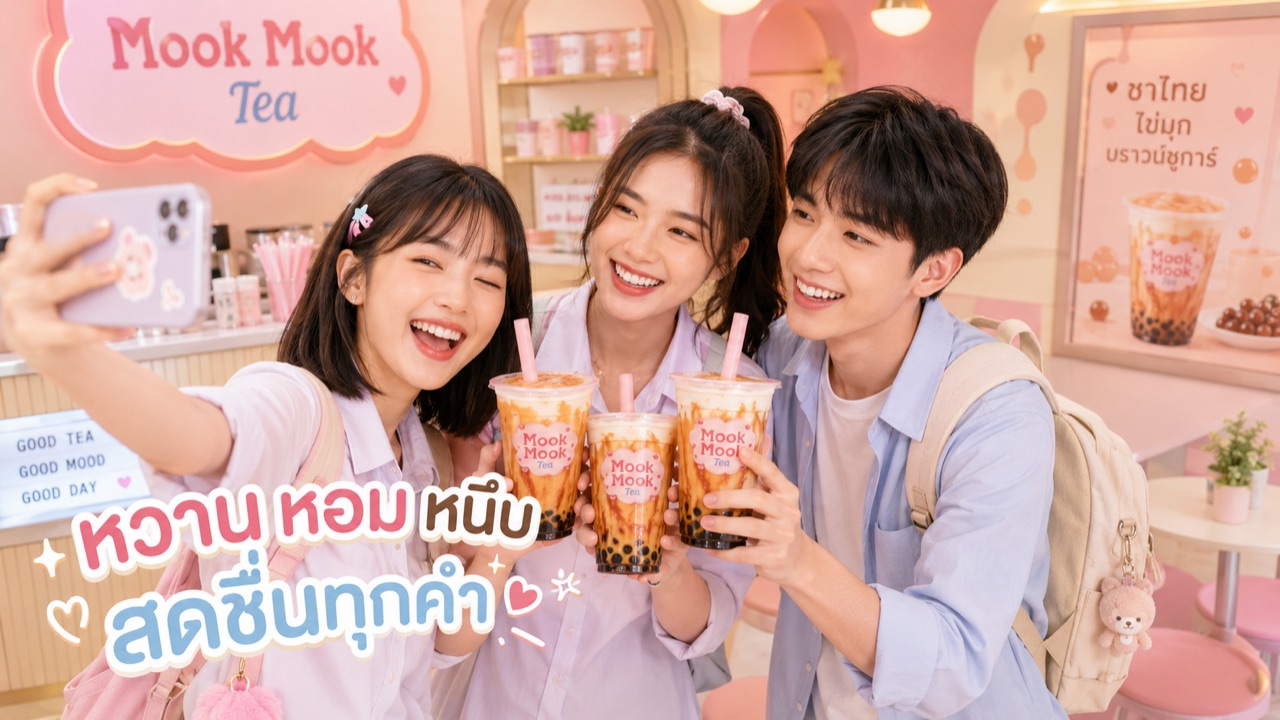 ฉาก 3 · 7–11 วิ
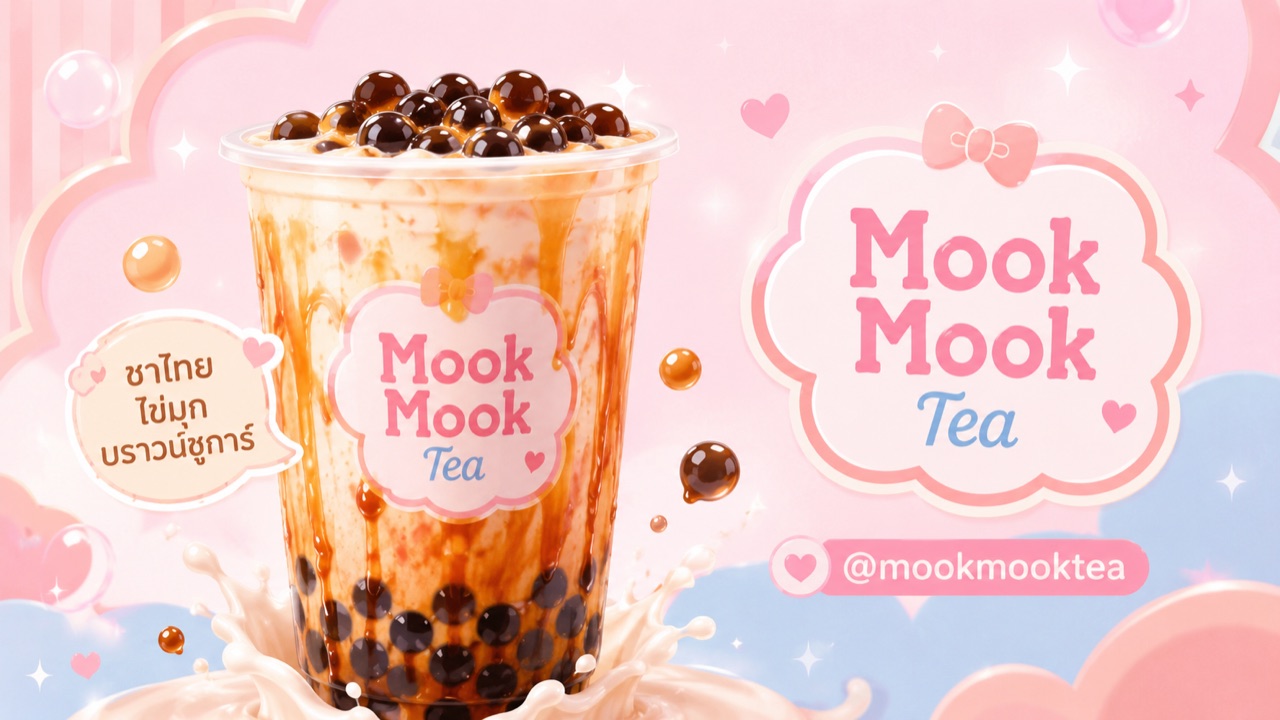 ฉาก 4 · 11–15 วิ
Visual style: bright pastel commercial video for a cute bubble tea brand named "Mook Mook Tea", fun, fresh, adorable, youthful, Thai teen lifestyle, pastel pink, cream, light blue, warm Thai tea orange, caramel brown, soft glow, clean composition, glossy drink texture, appetizing food commercial style, cute cafe atmosphere, smooth camera movement, high detail, shallow depth of field, soft lighting, playful hearts and bubble shapes, trendy for students and university teenagers.

Brand consistency: always use the same Mook Mook Tea cup design, clear plastic cup, pink straw, cute pink cloud logo label, Thai tea orange drink, creamy milk swirl, glossy brown sugar syrup, visible dark tapioca pearls at the bottom.

Avoid: dark mood, luxury black tone, messy background, realistic fast food style, unreadable text, distorted logo, deformed hands, extra fingers, scary faces, overly adult sexy styling, low quality, shaky camera.
Create a 3-second vertical or horizontal short commercial video scene for Mook Mook Tea.

Scene 1: A close-up hero shot of one cup of Thai tea brown sugar bubble tea on a cute pastel table inside a bright pink cream bubble tea shop. The drink looks refreshing and delicious: Thai tea orange color, creamy milk swirl, glossy brown sugar streaks inside the cup, dark tapioca pearls at the bottom, ice cubes on top, pink straw, condensation droplets on the clear plastic cup. The Mook Mook Tea logo label is visible on the cup.

Camera movement: slow gentle push-in toward the cup, slight parallax, soft focus background, product stays sharp. Small sparkle and bubble elements subtly appear around the drink.

Mood: fresh, cute, fun, pastel, youthful, appetizing.

Leave clean empty space on the left side for Thai text overlay added later.

Text overlay to add later:
"เมนูใหม่มาแล้ว!"
Create a 4-second short commercial video scene for Mook Mook Tea.

Scene 2: A close-up preparation shot of Thai tea being poured in slow motion into a clear plastic cup filled with brown sugar pearls and glossy brown sugar syrup. The Thai tea flows smoothly from the top right into the cup, mixing with creamy milk and caramel brown sugar swirls. The pearls at the bottom look shiny and chewy. The cup has the same cute Mook Mook Tea pink cloud logo label and a pastel cafe background.

Camera movement: 45-degree close-up angle, slow motion pour, slight handheld commercial movement, focus follows the flowing tea and cup. Make the liquid motion smooth, creamy, and satisfying.

Mood: delicious, fresh, sweet, creamy, fun, pastel cafe commercial.

Leave clean empty space on the left side for Thai text overlay added later.

Text overlay to add later:
"ชาไทยไข่มุกบราวน์ชูการ์"
Create a 4-second short commercial video scene for Mook Mook Tea.

Scene 3: Three cheerful Thai or Asian teen students inside the same cute pastel Mook Mook Tea cafe. Keep the same character look consistently: one girl with shoulder-length dark hair and pastel hair clip, one girl with a ponytail, and one boy with neat short dark hair. They are wearing cute casual student-style outfits in pastel colors. They smile brightly, take a selfie with a smartphone, and lightly clink their Mook Mook Tea cups together.

Each person holds the same new drink: Thai tea brown sugar bubble tea, orange creamy tea, brown sugar swirls, dark tapioca pearls at the bottom, pink straw, Mook Mook Tea logo on the cup.

Camera movement: medium shot, selfie-style energy, slight dolly-in, natural happy movement, cups move toward the camera for a fun toast moment.

Mood: fun, friendly, fresh, youthful, student lifestyle, pastel, adorable.

Leave clean empty space at the lower left for Thai text overlay added later.

Text overlay to add later:
"หวาน หอม หนึบ สดชื่นทุกคำ"
Create a 4-second final end-card commercial video scene for Mook Mook Tea.

Scene 4: A clean pastel hero shot of one large cup of Thai tea brown sugar bubble tea centered in the frame. The cup looks glossy, cold, and delicious with Thai tea orange, creamy milk swirls, caramel brown sugar syrup, dark tapioca pearls, ice cubes, and a pink straw. The Mook Mook Tea logo is clearly visible on the cup. The background is a cute pastel graphic backdrop with pink, cream, light blue, soft hearts, bubbles, rounded shapes, sparkles, and a sweet youthful feeling.

Camera movement: slow gentle zoom-in toward the cup, then the logo area appears with a soft pop animation feeling. Keep the frame clean and memorable.

Mood: cute, fresh, bright, polished, commercial ending card.

Leave clean space on the right side for logo and social handle added later.

Text / graphic overlay to add later:
"Mook Mook Tea"
"@mookmooktea"
Create a 15-second short commercial video for a cute bubble tea shop named "Mook Mook Tea" introducing a new menu: Thai Tea Brown Sugar Bubble Tea.

Overall style: bright pastel commercial video, cute, fun, fresh, adorable, youthful, made for students and university teenagers. Use pastel pink, cream, light blue, warm Thai tea orange, and caramel brown. The cafe is cute, modern, clean, and playful with soft hearts, bubbles, rounded shapes, and warm lighting.

Scene 1, 0–3 seconds:
Close-up hero shot of one cup of Thai tea brown sugar bubble tea on a pastel table. The cup has Thai tea orange color, creamy milk swirl, glossy brown sugar streaks, dark tapioca pearls at the bottom, ice cubes, pink straw, condensation droplets, and a cute Mook Mook Tea logo label. Camera slowly pushes in.

Scene 2, 3–7 seconds:
Slow motion preparation shot. Thai tea is poured into a clear cup filled with brown sugar syrup and tapioca pearls. The tea mixes beautifully with creamy milk and caramel syrup. Camera angle is 45-degree close-up, focused on the flowing tea and glossy pearls.

Scene 3, 7–11 seconds:
Three cheerful Thai or Asian teen students in pastel casual student outfits smile in the same Mook Mook Tea cafe. One girl has shoulder-length dark hair with pastel hair clip, one girl has a ponytail, and one boy has neat short dark hair. They take a selfie and lightly clink their Mook Mook Tea cups together. The mood is happy, fresh, and social.

Scene 4, 11–15 seconds:
Final product hero shot. One large cup of Thai tea brown sugar bubble tea is centered on a clean pastel graphic background with hearts, bubbles, sparkles, and soft pink-blue shapes. The shot ends with space for the Mook Mook Tea logo and handle @mookmooktea.

Camera: smooth dolly-in, clean commercial movement, soft glow, shallow depth of field, high detail, appetizing drink texture.

Important: keep the same cup design, same pastel brand identity, same cute cafe style, and same drink appearance across every scene.

Do not generate unreadable text. Leave space for Thai text overlays to be added later in editing.
Scene 1:
เมนูใหม่มาแล้ว!

Scene 2:
ชาไทยไข่มุกบราวน์ชูการ์

Scene 3:
หวาน หอม หนึบ สดชื่นทุกคำ

Scene 4:
Mook Mook Tea
@mookmooktea
คลิปจริงจาก Google Flow (Veo) — 4 คลิปย่อย (ดิบ) ยังไม่ใส่ตัวอักษร · กด ▶️ เล่นดูได้เลย
▶️ ขั้นต่อไป: นำ 4 คลิปมาต่อกันในโปรแกรมตัดต่อ (CapCut / Canva / Premiere) → ใส่ข้อความบนจอ (Step 4) → ใส่เพลง/เสียง → Export ออกมาเป็นคลิปเต็ม พร้อมโพสต์ แบบนี้ 👇
- เริ่มที่เรื่องก่อนเสมอ — สตอรี่บอร์ดชัด วิดีโอถึงจะไม่หลุดทิศทาง
- คลิปสั้นทำง่ายกว่า — 15–30 วิ แบ่ง 3–5 ฉากกำลังดี
- ใช้ภาพอ้างอิง (Ingredients) คุมให้ตัวละคร/สินค้าเหมือนเดิมทุกฉาก
- ระบุกล้องใน prompt ให้ชัด — มุมกล้อง + การเคลื่อนกล้อง ช่วยให้คลิปดูมืออาชีพ
- สร้างหลายเทคแล้วค่อยเลือก — AI วิดีโอไม่เป๊ะครั้งแรกเสมอ ต้องลองหลายรอบ
Google Flow เป็นเครื่องมือทำหนังด้วย AI ของ Google Labs (ขับเคลื่อนด้วย Veo) · การเข้าถึง ฟีเจอร์ และแพ็กเกจอาจต่างกันตามประเทศและการอัปเดต